
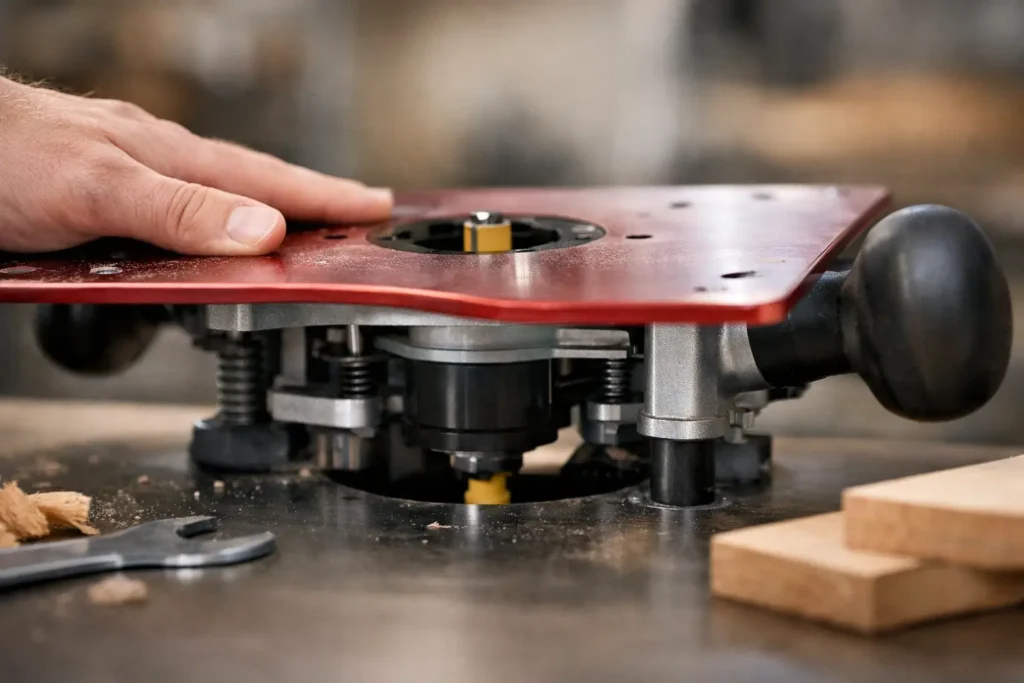
A router should feel planted when its base is on the work. If it rocks, bows, or changes position as you apply normal cutting pressure, accuracy disappears quickly. If you are asking, “why does router plate flex,” the answer usually comes down to material stiffness, unsupported span, mounting fit, or pressure being applied in the wrong place.
A little movement may not matter when easing a small round-over. It matters a great deal when following a template, cutting hinge mortises, routing inlays, flattening a slab, or making repeated passes in a jig. Plate flex can change cutting depth, move the bit away from a guide, and leave uneven edges that look like a router-control problem.
First, identify which router plate is flexing
“Router plate” can mean two different parts. A handheld router baseplate attaches directly to the bottom of the router and rides on the workpiece, template, or guide system. A router table insert plate supports a router below the table surface.
The causes overlap, but the symptoms differ. A handheld baseplate that flexes usually affects cut position and edge quality while you are pushing the router. A table insert plate that flexes can cause the workpiece to dip near the bit, changing the cut depth or making stock snag at the opening.
Before replacing anything, remove the router from the work and check the plate on a known flat surface. Then check it again while it is mounted. A plate that looks flat by itself can flex once screws are tightened against an uneven router housing, poorly seated inserts, or a distorted mounting surface.
Why does a router plate flex under load?
Every plate bends to some degree. The practical question is whether it bends enough to affect the cut. Stiffness depends on more than the material name stamped on the product. Thickness, diameter, shape, mounting points, and the size of openings all matter.
The material is too thin for the span
Thin plastic, acrylic, phenolic, aluminum, and steel all have limits. A large-diameter plate has more unsupported area than a compact factory sub-base. If the material is thin, pressing down near an outer edge can make it dish toward the work.
This is common with oversized baseplates used for template work. The larger footprint is useful because it bridges wider openings and gives more bearing area, but it also needs enough thickness and rigidity to support the larger span. A large plate made too thin can be less stable than a smaller, well-supported base.
Clear acrylic plates are often blamed first. Acrylic can work well for visibility, especially when properly sized and thick enough for the router and task. But a thin clear plate with a wide center opening is more likely to flex than a thicker plate designed with the same routing load in mind. Material alone does not tell the whole story.
The center opening removes critical support
The opening around the bit is the weakest area of most router baseplates and table inserts. As that opening gets larger, less material remains to resist downward pressure and vibration.
A large opening is sometimes necessary for bigger bits, guide bushings, or dust collection arrangements. The trade-off is reduced support around the cutter. For handheld use, fit the smallest practical insert ring or center opening for the bit and guide bushing you are using. For a router table, use reducing rings when available rather than leaving a large opening exposed for every operation.
A plate may also flex if an insert ring sits low, rocks in its recess, or is not fully supported around its edge. What feels like plate deflection may actually be the workpiece dropping into a loose insert area.
The router is not supported at the correct mounting points
A router baseplate needs to mount flat against the router base using the correct screw pattern, screw type, and countersunk locations. If a screw bottoms out before clamping the plate, the plate can move. If a screw is too long, it may create a high spot. If a countersunk screw head is proud of the surface, it can keep the plate from sitting flat on the work.
Do not assume two routers from the same manufacturer share the same base pattern. Router models, production generations, and plunge versus fixed bases can have different mounting holes and center locations. A near-fit is not a proper fit.
An incompatible plate can be forced onto a router, but the resulting stress may bow the plate before you ever make a cut. It can also put the bit off-center in the opening, reduce clearance, and make guide-bushing work unreliable. Select the baseplate for the exact router model whenever possible. For nonstandard configurations, a custom mounting solution is usually better than drilling a pattern by guesswork.
The plate is mounted over debris or damage
Fine chips, dried finish, burrs, a damaged factory base, or a raised screw hole can create a pivot point. Once the router is loaded, the plate bends around that point and feels unstable.
Clean both mating surfaces before installation. Check the router base for dents and raised edges. Inspect the plate for cracked areas near screw holes, center openings, and narrow sections around insert recesses. A crack may be hard to see in clear material, but it will often show up as a plate that suddenly flexes more than it did previously.
Hand pressure is concentrated at one edge
Even a good plate can deflect if the router is pushed down hard at the far edge while the opposite side bridges an opening, a workpiece edge, or an uneven template. This happens often when routing a narrow rail, following a small template, or making a cut near a hole.
Keep both hands balanced on the router handles or base. When the plate must cross a void, add a support board or use a jig that gives the entire plate a stable bearing surface. Do not use extra force to make a dull bit cut. A sharp bit, shallow passes, and a controlled feed rate reduce both cutting force and the urge to lean on the router.
How to diagnose flex before it ruins a project
Start with the router unplugged and the bit removed. Set the mounted router on a flat reference surface. Press gently at several points around the plate perimeter. Watch for rocking, gaps, or visible movement. Repeat the check with the router positioned over a straight template or scrap board with a routed opening. The plate may be stable on a solid bench but flex when it bridges a gap.
Next, check the screws. They should be snug and seated correctly, not overtightened. Overtightening can distort plastic plates, strip threads, crack material near the holes, or pull a plate unevenly against the router base. Tighten screws in a balanced pattern rather than fully tightening one side first.
Make a test cut in scrap with a straight bit and a guide or template. If the cut gets deeper when you press on the router, or if the offset from the guide changes around a curve, plate flex or rocking is a likely cause. If the depth stays consistent but the edge burns or chatters, look at bit sharpness, feed rate, collet condition, and router speed as well.
Choosing a plate that stays stable
The right plate is not simply the thickest one available. It needs to match the router, clear the bits and guide bushings you use, sit flat, and provide the footprint needed for your work.
For ordinary edge profiling, a standard-size, correctly fitted baseplate may be all you need. For template routing, sign work, inlays, and jigs, an oversized plate can improve control because it distributes the router’s weight over more surface. Choose one with sufficient thickness and a center opening suited to your common accessories.
For router tables, plate stiffness must be considered with the table opening and leveling system. A quality insert plate can still sag if the supporting ledge is narrow, uneven, or missing support near the center. Check the plate in the actual table, not just on the bench. Leveling screws should support the plate without creating high points that make stock catch.
Compatibility is the starting point. A plate built for the exact router base aligns the mounting holes, centers the bit correctly, and avoids forcing the material into a stressed position. If your router has modified hardware, an uncommon model, or a special-use requirement, provide the router details and the intended use before ordering. Hobby Woodcraft can help with custom plate requirements where a standard pattern is not the right answer.
Fix the support, not just the symptom
Adding a thicker plate may solve the problem, but only if thickness is the real cause. Replace a cracked or permanently warped plate. Correct proud screws, clean the router base, use the proper insert ring, and support the router when it crosses openings. If the plate only flexes during a particular operation, improve the jig or work support before changing hardware.
A router plate should make the tool easier to control, not become another variable in the cut. Once the plate sits flat, mounts correctly, and has solid support where you need it, your templates, guides, and cutting depth can perform as intended.